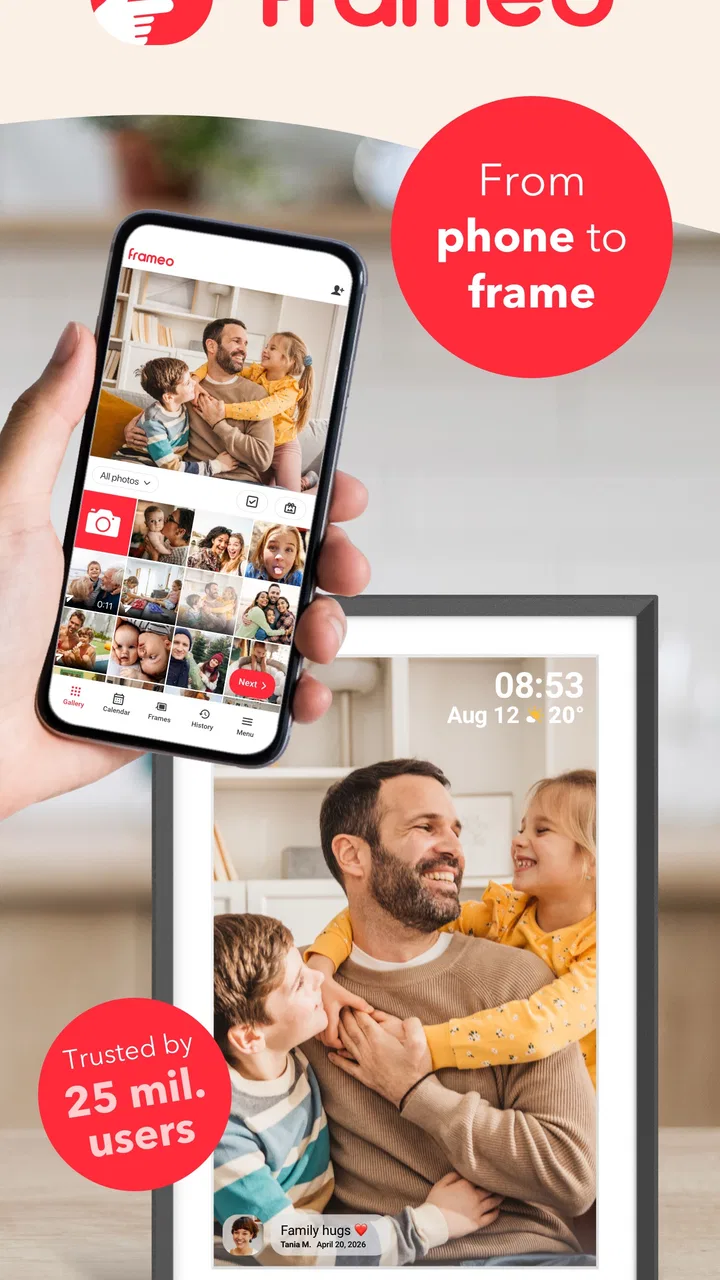
Frameo: Share to photo frames
- 4.8
- Rating
- 5.00M
- Installs
- Free
- Price

 Analysis by App-foxy
I like the idea behind Frameo: Share to photo frames because it turns a digital frame into something more personal than a screen that simply runs a slideshow. Instead of waiting until you are physically near the frame, you can send a photo from your phone and let it appear in a family member’s home. In my experience, that makes the app most interesting when the people sharing pictures are in different places.
This is a free photography app from Frameo, designed around compatible Frameo WiFi digital photo frames. It is available to everyone by age rating, and its basic appeal is easy to understand: choose a picture on your smartphone, send it to a connected frame, and use the frame as a quiet way to stay present in someone else’s daily life. The app has been around since late 2016, which gives the concept a more established feel than a brand-new photo-sharing experiment.
How the connection changes the experience
I find the connection changes more than the delivery method: it shifts photo sharing from a moment of direct attention to a small surprise waiting in a room. That works best when everyone treats the frame as a relaxed destination, not a guaranteed messaging channel. With that distinction clear, the next question is how to make the handoff feel natural for both the person sending and the person receiving.
You May Also Like

 Blood Strike: 2.5 Anniversary
Blood Strike’s Loadouts Turn Every Drop Into a Tactical Gamble
A close look at Blood Strike’s custom loadouts: how fast access to signature weapons reshapes its battle royale rhythm, rewards preparation, and narrows the gap between fights.

 Pandora - Music & Podcasts
Pandora’s Music Is Easy to Start, but Harder to Recover
Pandora’s strength is its low-effort path from a seed to a station. Its weak spot is how much confidence it asks you to place in connection, setup, and quiet recovery.

 8 Ball Pool
 Is Built on Rivalries, Rematches, and Routine
A close look at the rivalries, rematches, shared routines, and unanswered safety questions that turn a quick pool match into a persistent mobile community.

 Samsung Music
’s Quiet Strength Is Playing What You Already Own
Its reach comes less from spectacle than from dependable access to a personal library. That simplicity is both the app’s strongest retention engine and its ceiling.

 AccuWeather: Weather Radar
AccuWeather Review: A Quick, Clear Forecast for Everyday Decisions
For everyday plans, the best forecast is the one you can understand quickly. AccuWeather makes rain timing, radar, and local conditions easy to act on, with a few trade-offs.

 Hill Climb Racing
Why Hill Climb Racing Still Turns Crashes Into One More Run
A tiny car, a bumpy hill and one more upgrade: Hill Climb Racing keeps resurfacing because its simple chaos makes every near-miss feel personal.
More From Our News Desk



When a photo feels better than another message
The strongest use case is not sending a large batch of images just because the option exists. It is sending one well-chosen picture at the right moment. A child can share a school project with grandparents, a traveler can send a view from the day, or a family member can add a quick snapshot to a parent’s living room without starting a conversation that requires an immediate reply.
That distinction matters. A messaging app is built around attention: notifications, replies, reactions and a stream that moves quickly. A Frameo frame is slower and more physical. The recipient may notice the new image while making coffee or walking past the frame, rather than opening a phone to check an inbox. I found that this makes the act of sharing feel less demanding for both sides.
The connection is also the point where the experience can become less predictable. Sending a picture from the phone is only one part of the journey. The image still has to reach the frame, and the frame has to be ready to receive it. If the household network is busy or the frame is not currently communicating properly, the emotional simplicity of “I sent a photo” can turn into uncertainty.
For that reason, I would not treat the app as a replacement for an urgent message. It is better for a thoughtful update than for information that needs confirmation. If I were arranging a pickup, checking whether someone arrived safely, or sharing a time-sensitive instruction, I would use a messaging or calling app instead. The frame is at its best when the picture itself is the message.
The everyday family scenario where it makes sense
Imagine a family with a Frameo WiFi frame in the kitchen and relatives living several hours away. During the week, someone takes a picture of a new drawing, a garden project or a weekend walk. From the phone, they select the image and send it to the frame. The recipient does not need to maintain a conversation or remember to open a social feed; the new picture becomes part of the room when the connection works as expected.
That workflow is especially appealing for people who enjoy physical photos but do not want to print every update. It also avoids the pressure of making every family moment public. The sharing is directed toward a particular frame rather than presented as a performance for a broad audience. I see that as one of the app’s more meaningful differences from ordinary social networks.
Why the phone remains central
The app is not trying to replace the camera, gallery or editing tools already on a smartphone. Its job begins after the photo has been taken. That keeps the experience focused, but it also means the quality of the result depends heavily on the image you choose and the way it looks on the receiving frame.
I recommend checking the picture before sending it, especially when the subject is close to the edge or when the image contains small text. A photo that looks clear on a phone can be less effective when displayed in a different shape or viewed from across a room. A simple, well-composed image usually works better than a crowded screenshot or a picture with important details tucked into the corners.
Using it while away from home
The mobile advantage becomes clearer when I am traveling. I can keep taking photos with the phone I already carry, then decide which ones deserve to be sent to the frame. That makes the app feel more deliberate than automatically syncing an entire camera roll. It gives me a small editorial decision: this is the image I want someone at home to see.
There is a trade-off, though. A phone is often used in places where connectivity changes from one moment to the next. I would avoid assuming that a send action has completed simply because I tapped the button. When the destination matters, I would check the frame later or confirm with the recipient through another channel. The app works best when users understand that a connected photo frame is part of a networked chain, not a local cable transfer.
Sharing from ordinary mobile routines
One practical habit is to send pictures at natural stopping points rather than while rushing between activities. After taking several photos at a birthday or family visit, I would first remove near-duplicates and blurry shots, then send only the images that tell the story clearly. This reduces clutter on the frame and makes each new arrival feel more intentional.
Another useful habit is to think about the recipient’s room. A dark night photo may look atmospheric on the phone but become difficult to appreciate in a bright space. A portrait with a busy background may lose its impact when it is seen from a distance. The app makes sharing convenient, but it does not make every photo suitable for a digital frame.
What happens when delivery is not smooth
Connectivity is where I would set the most realistic expectations. The app’s purpose depends on a smartphone sending an image to a compatible frame through a WiFi connection. That means a weak or interrupted connection can affect the handoff. I would not describe the experience as completely frictionless, because the frame, the phone and the network all have to cooperate.
When a picture does not appear, my first response would be practical rather than repeatedly tapping send. I would check whether the phone is connected normally, whether the frame is powered and connected, and whether the recipient can see any change. Repeating the action several times can create confusion if the original request eventually arrives and the same photo appears more than once.
A second sensible step is to send a less complicated test image. If a simple photo arrives but a larger or more demanding image does not, the problem may be related to the particular file or the transfer conditions rather than the whole setup. I would also avoid troubleshooting during a busy family moment; sending a quick message separately can establish whether the recipient’s frame is available before spending time on the app.
Recovery without turning the app into a support task
The best connected products are the ones people can recover from without needing technical knowledge. Frameo’s concept is approachable, but the household using the frame may include people who are not comfortable diagnosing network problems. In my opinion, the person who installs and shares to the frame should be prepared to explain a simple routine: keep the frame powered, check its connection when a new picture is expected, and use another communication method if the image is important.
This is also why I would introduce the app gradually. Start with one or two photos, make sure the recipient can identify the new image, and only then build a regular sharing habit. That approach is less frustrating than filling the system with a large collection before confirming that the basic path works.
For a family member who wants total certainty, a printed photo or a direct message may still be better. Printing is slower but tangible. Messaging gives immediate confirmation and conversation. Frameo sits between those choices: more visible and lasting than a message, but more dependent on a working connected frame than a print.
Being selective with mobile data and attention
Because the app is used to move photos from a phone to a frame, I would make photo selection part of responsible everyday use. Sending every image from an outing is unnecessary for most households. A smaller set is easier for the recipient to enjoy and avoids turning the frame into a constantly changing feed that nobody notices.
I would also be careful when sharing while using a limited mobile connection. The sensible approach is to send important images when the phone has a reliable connection, especially if the pictures are high quality or if several images are queued. I am not treating this as a promise about how the app handles every network condition; it is simply a good user habit whenever photos are being transferred.
Privacy deserves attention too. A frame in a shared room is not the same as a private phone gallery. Before sending a picture, I would consider who can physically see the display and whether the image contains addresses, documents, school details or other information that was meant only for a smaller audience. The convenience of remote sharing should not replace ordinary judgment about the content of a photo.
Where paid extras fit into the decision
The app is free to install, while in-app purchases are listed from around two dollars to around twenty dollars per item. That makes it easy to try the central idea without committing money at the start, but I would still look carefully at any purchase screen before confirming an add-on. The free entry point is a genuine advantage for families who first want to see whether a connected frame fits their routine.
I would not choose the app solely because it is free, and I would not assume that every household needs paid extras. The important question is whether the basic sharing workflow already solves the problem. If the frame is rarely viewed or the family prefers a private cloud album, spending more inside the app may not improve the experience. If the frame becomes a daily family touchpoint, additional spending may feel more reasonable, but that is a personal value judgment rather than a requirement for trying it.
How it compares with familiar alternatives
Compared with a social network, Frameo is quieter and more focused. There is no need to compete for attention with unrelated posts, and the destination is a physical frame rather than a scrolling feed. That makes it a better fit for grandparents, relatives or households that want selected family images without asking everyone to become active on a social platform.
Compared with a cloud photo album, it is more immediate in the room but less suited to searching through a large archive. An album is useful when I want to browse years of pictures, organize events or find a specific image. A frame is better when I want a small, visible rotation of moments that can be enjoyed passively.
Compared with Bluetooth transfer or a memory card, the appeal is remote sharing. I do not need to be beside the frame every time I want to add a photo. The cost of that convenience is dependence on the connected setup. A local transfer can be simpler when I am standing next to the device, while Frameo is more valuable when distance is the reason for buying the frame in the first place.
Compared with printing, the app offers speed and flexibility, but a print has a permanence and texture that a screen cannot reproduce. I would use Frameo for ongoing family updates and printing for images that deserve a place in an album or on a wall. The two approaches are not enemies; they serve different emotional purposes.
Who will enjoy it most
I think the app is a strong match for families already committed to using a compatible Frameo WiFi digital photo frame. It is also appealing for people who want to share pictures with relatives who may not enjoy social media or who do not want to manage a complicated photo service. The recipient does not have to respond every time a new image arrives, which keeps the exchange gentle.
It is less suitable for someone who only wants a general-purpose photo editor, a full backup system or a searchable gallery. It is also not my first choice for urgent communication, professional photography delivery or situations where every transfer must be confirmed immediately. The app has a clear purpose, and it is most satisfying when that purpose matches the household’s habits.
What its popularity tells me
Frameo has earned a 4.8 average from around ninety-nine thousand ratings and has passed five million installs. Those figures suggest that the idea resonates with a substantial number of Android users, especially people looking for a simple bridge between phone photos and a physical display. They do not remove the need to check whether the connected-frame setup suits a particular home, but they do show that this is not an obscure experiment.
The developer, Frameo, has kept the product centered on a recognizable use case rather than trying to turn it into a general social platform. I appreciate that focus. At the same time, the narrow purpose means the app’s value is tied to owning or planning to use the right kind of frame. Without that destination, the app has little reason to stay on the phone.
My connectivity verdict
After looking at the app as a daily sharing tool, I see its main strength in the small moment between sending and noticing. A photo can cross the distance between relatives and appear in a real room without demanding a reply. That is a warmer experience than another notification, and it gives ordinary snapshots a visible place in family life.
The compromise is clear: the experience depends on the connected path working properly, and users need sensible expectations when a picture does not appear immediately. I would keep another communication method available for anything important, select photos thoughtfully, and introduce the frame with a small test rather than a huge upload.
My recommendation is positive for families that want a dedicated, low-pressure way to share selected photos with a household using a Frameo frame. I would skip it if I needed editing tools, archival organization or guaranteed real-time communication. For the right situation, though, Frameo: Share to photo frames makes connectivity feel less like a technical feature and more like a quiet way of showing up in someone’s day.
FAQs for Frameo: Share to photo frames
01What is Frameo and how does it work?
Frameo is a user-friendly app designed to share photos directly to digital photo frames. Once installed, you can easily send pictures from your smartphone to any connected Frameo device. This seamless process allows families and friends to instantly share moments, keeping everyone connected regardless of distance.
02Is Frameo compatible with all digital photo frames?
Frameo is specifically designed to work with Frameo-supported digital photo frames. It may not be compatible with frames from other brands. Ensure that the frame you intend to use supports Frameo by checking the manufacturer's specifications or consulting the retailer before purchase.
03How secure is the photo sharing process in Frameo?
Frameo prioritizes user privacy and employs secure data transmission protocols to protect your photos. The app uses a unique code to pair devices, ensuring that only authorized users can send pictures to your frame. This approach minimizes the risk of unauthorized access to your shared memories.
04Can I manage multiple frames with one Frameo account?
Yes, Frameo allows you to manage multiple digital photo frames from a single account. This feature is ideal for users who wish to share photos with different family members or friends, providing an organized and efficient way to control the content displayed on each frame.
05Are there any additional costs associated with using Frameo?
Frameo itself is typically free to download, but it's important to check if there are any in-app purchases or subscription fees required for additional features. Additionally, purchasing a compatible digital photo frame may involve a cost, so consider these factors when planning to use Frameo.
Pros
- User-friendly interface for easy navigation.
- Quick and seamless photo sharing.
- Compatible with multiple devices.
- Allows personalized captions with photos.
- Secure and private sharing options.
Cons
- Limited editing features for photos.
- Requires internet connection to share.
- No cloud backup for photos.
- Notifications can be overwhelming.
- Limited frame customization options.

Frameo: Share to photo frames
Gallery